
Calculator hardware refers to the physical device itself, such as a handheld Casio scientific or TI graphing calculator. Calculator software includes desktop applications, mobile apps, and powerful online tools like eLearnSmart’s 100+ free calculators that perform calculations on a computer or phone.
From balancing a budget to solving tough math problems, calculators are essential tools for daily life and school. They used to be bulky physical devices, but now you can choose from a wide range of hardware and software options. With so many choices, from classic handheld models to advanced online tools, how do you pick the right one? It’s not just about finding any calculator—it’s about finding the one that best fits your needs, budget, and style.
This guide will help you understand the world of calculators in 2024, making it easier to choose between physical hardware and digital apps. We’ll explore why physical devices remain popular, looking at factors like the calculator Casio price, the scientific calculator price, and why the graphing calculator price for models like the TI-84 is a key consideration. We will also cover the convenience of software-based calculators, including how to compare the scientific calculator online price and find the best scientific calculator Casio price.
Whether you’re a student, a professional, or just need to do math quickly, it’s important to understand the pros and cons of each type. This article will give you the information you need to make a smart choice. We’ll also highlight helpful platforms like eLearnSmart.com, where you can use over 100 professional calculators absolutely free. So, let’s figure out if a calculator is software or hardware and discover the best tools available for you today.
Is a calculator a software or hardware?

Understanding Calculator Hardware: The Physical Devices
A calculator can be a physical device that you hold in your hand. These devices have circuits, a screen, and buttons for input. Examples include classic Casio Scientific calculators and TI Graphing calculators. They use internal processors and memory to do calculations.
Hardware calculators have several key benefits. They are reliable and built to last. Many students use them for tests that don’t allow internet access. The scientific calculator price can vary a lot based on features and brand. Common types include:
- Basic Calculators: For simple, everyday math. They are usually inexpensive.
- Scientific Calculators: Needed for high school and college math and science. They handle harder problems like trigonometry and logarithms. Popular brands include Casio and Sharp. It’s easy to buy online Casio scientific calculators.
- Graphing Calculators: These are advanced tools for drawing graphs and solving complex equations. The TI-84 is a popular choice for schools [source: https://education.ti.com/en/us/products/graphing-calculators/ti-84-plus-ce-python/overview/ti-84-plus-ce-python-calculator]. They also tend to have a higher graphing calculator price.
- Financial Calculators: Made for business, finance, and real estate math.
You can buy these physical calculators from many places, like office supply stores or online on Amazon and Walmart. When you scientific calculator buy online, be sure to compare features and read reviews.
Exploring Calculator Software: The Digital Brains
On the other hand, a calculator can also be software. These are apps that run on your computer, smartphone, or in a web browser. They work just like physical calculators. In fact, most people use software calculators every day, like the one built into your phone.
Software calculators are very convenient and easy to use. They are often free or cheap. Many have advanced features that you would only find on expensive physical models. Plus, they are always being updated with new improvements. Key types of calculator software include:
- Desktop Calculator Apps: Programs like Moffsoft Calculator 2 give you more features on your computer.
- Mobile Apps: There are many free and paid calculator apps for iOS and Android phones.
- Spreadsheet Calculators: Programs like Microsoft Excel or Google Sheets work as powerful online excel calculator tools. They use formulas and functions to solve complex problems.
- Specialized Online Calculators: Some websites offer tools for very specific jobs, like an online entropy calculator or a mu calculator online. These are typically easy to use.
- Interactive Website Widgets: Many sites include built-in tools for certain tasks, such as a form calculation widget Jotform.
At eLearnSmart, we focus on calculator software. Our site offers over 100+ free professional online calculators for 13 different school subjects. These tools are designed to help you master any topic, making hard calculations easy for everyone. We provide a great alternative to buying expensive physical calculators. Our calculator online price is simple: always free.
So, a calculator is not just a piece of hardware or a piece of software. It can be both. The best choice depends on your needs, like whether you need it for a test, for travel, or for powerful calculations. Both types play an important part in school and in everyday life.
What is the hardware of a calculator?
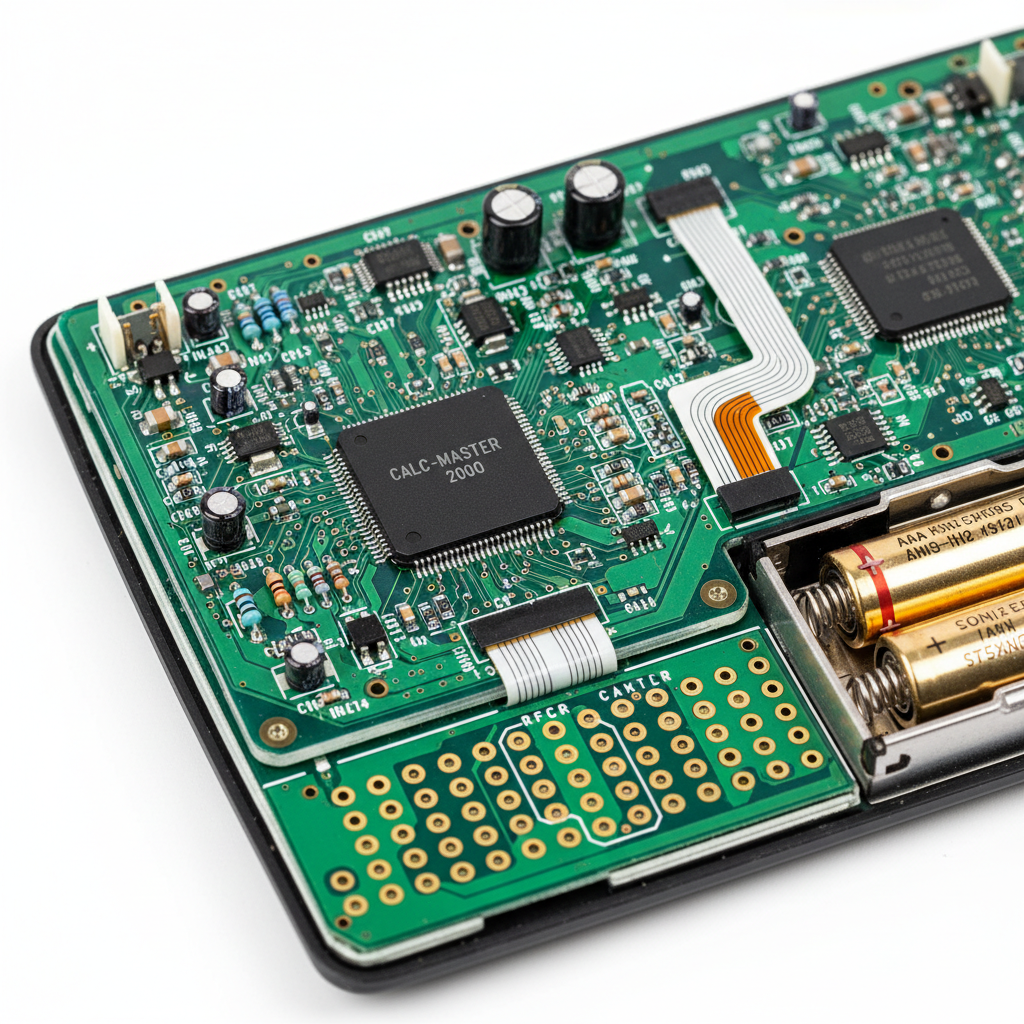
Calculator hardware refers to the physical devices used for math. Different calculators handle everything from simple math to complex calculus. Each type has its own hardware.
Today, powerful online calculators are a great alternative. For example, ElearnSmart offers over 100 free professional online calculators. Still, many people find physical calculators very useful.
Scientific Calculators: Price & Top Models (Casio, Sharp)
Scientific calculators are essential tools. They can solve math problems that go beyond basic arithmetic. This includes trigonometry, logarithms, and statistics. High school and college students use them often.
Typical Features of Scientific Calculators:
- Function Keys: Special buttons for sine, cosine, tangent, log, and exponents.
- Memory Functions: Save and recall numbers for calculations with multiple steps.
- Display: Often has multiple lines to show both your input and the answer.
- Power Source: Usually powered by batteries, sometimes with a solar panel for backup.
Price Range:
A scientific calculator usually costs between $10 and $30. More advanced models can cost up to $50. For example, a Casio fx-991EX ClassWiz costs about $20 [1]. This makes them affordable for most students.
Top Models:
Casio and Sharp are the two biggest names in scientific calculators. Both brands make reliable calculators with many features.
- Casio Scientific Calculators: Casio is a leader in the market. Models like the Casio fx-991EX ClassWiz are very popular. They have high-resolution screens and features perfect for science, tech, engineering, and math (STEM). Many people choose Casio because it’s easy to use.
- Sharp Scientific Calculators: Sharp also makes great scientific calculators. The Sharp EL-W516TBSL is another top choice. It has a special WriteView display and many different functions. Many schools allow these models for standardized tests.
If you need a calculator right away, ElearnSmart offers a range of free scientific calculators online. They offer the same great features without the cost.
Graphing Calculators: When Do You Need One? (TI-84 vs TI-89)
Graphing calculators are more advanced. They can draw graphs of equations. This helps you see functions, study data, and solve tough problems. You often need one for advanced math classes.
Key Applications for Graphing Calculators:
- Algebra II & Pre-Calculus: For graphing parabolas, lines, and other functions.
- Calculus: To visualize derivatives, integrals, and limits.
- Statistics: For plotting data and performing regressions.
- Standardized Tests: Many exams, like the SAT and AP tests, allow or require specific graphing calculators [2].
Price Range:
Graphing calculators cost a lot more than scientific models. Prices usually range from $100 to $180. The TI-84 Plus CE, a very popular model, often costs around $130 [3].
TI-84 vs. TI-89: Which One to Choose?
Texas Instruments (TI) is the biggest name in graphing calculators. The TI-84 and TI-89 are its most popular models.
| Feature | TI-84 Plus CE | TI-89 Titanium |
|---|---|---|
| Target User | High school, introductory college courses (Algebra, Pre-Calculus, Statistics) | Advanced college courses (Calculus, Differential Equations, Linear Algebra) |
| Core Functionality | Graphing, basic calculus, statistics, programming | Symbolic manipulation (CAS), 3D graphing, advanced calculus, physics constants |
| Ease of Use | Simpler to use and often taught in schools | Harder to learn but has more powerful features |
| Test Approval | SAT, ACT, AP, PSAT | ACT, AP, PSAT. Not permitted on the SAT for some sections due to CAS functionality [2]. |
| Price (Approx.) | $120 – $150 | $150 – $180 |
The TI-84 is a good choice for most high school students and for early college classes. The TI-89 Titanium is different because it has a Computer Algebra System (CAS). This system lets it solve equations with symbols, a powerful tool for higher-level math. Always check which calculators are allowed for your exam before you buy one.
ElearnSmart also offers free online graphing calculators. They can create complex graphs and are a great, free alternative for studying.
Financial & Basic Calculators
Besides scientific and graphing models, there are two other common types: basic and financial calculators.
Basic Calculators:
Basic calculators are simple, everyday tools. They do basic math like adding, subtracting, multiplying, and dividing. Many also have buttons for percentages and square roots.
- Purpose: Quick calculations for daily tasks, budgeting, or simple grocery store math.
- Price: Very affordable, typically under $10.
- Availability: Found everywhere from office supply stores to supermarkets.
Financial Calculators:
Financial calculators are special tools designed for complex money-related math. This includes calculating loan payments, interest rates, and cash flow.
- Target Users: Business professionals, finance students, real estate agents, and investors.
- Key Features: Special keys for time value of money (TVM), bond calculations, and amortization schedules.
- Price: Generally range from $30 to $80. Models like the HP 12c are highly regarded [4].
You can easily find tools for basic and financial math online. ElearnSmart has a full set of free financial calculators and basic math tools. This means you might not need a physical calculator.
Where to Buy Calculators Online (Amazon, Walmart, Staples)
Buying a calculator online is easy and often cheaper. You can easily compare models and read reviews. Many big stores have great options.
Top Online Retailers for Calculators:
- Amazon: Has a huge selection of scientific, graphing, financial, and basic calculators from brands like Casio, Sharp, and Texas Instruments. Its wide variety makes it a popular place to start.
- Walmart: Provides a good range of affordable calculators, both in-store and online. This is a reliable choice for budget-friendly models.
- Staples: Focuses on office and school supplies. They have a good stock of all calculator types. Look for their seasonal sales.
- Best Buy: A strong option for electronics. They often stock the latest graphing calculators.
- Manufacturer Websites: Sites like Casio’s official website or Texas Instruments’ site offer direct purchases. They usually have detailed product information and support.
Considerations When Buying Online:
- Price Comparison: Search online to compare prices and find the best deals.
- Shipping Costs: Factor in any delivery fees.
- Return Policy: Check the store’s return policy before you buy.
- Authenticity: To avoid fakes, buy from sellers you trust.
Physical calculators are still important, but don’t forget about powerful online tools. ElearnSmart offers over 100 free, professional calculators. These cover everything from basic math to advanced graphing and financial analysis. Our platform is an easy-to-use solution for all your calculation needs, including spreadsheet-style calculators and specialized tools like an entropy calculator.
Why are TI-84 calculators still so expensive?
Market Dominance in Education
Texas Instruments (TI) graphing calculators, especially the TI-84 series, are the top choice in US schools. This strong market position has a big impact on their price. For years, the TI-84 has been approved and recommended for major tests like the SAT, ACT, and Advanced Placement (AP) exams [5].
Teachers nationwide are trained to use these calculators. As a result, many lesson plans are designed around the TI-84’s features. High school math departments often require this specific model, which creates a cycle. Students feel they need a TI-84 to keep up in class.
Because the TI-84 is so common, parents and students feel they have to buy one. Other calculators, even if they are better or cheaper, find it hard to compete. This is because most teachers don’t know how to use them, or they aren’t approved for tests. This allows TI to keep the graphing calculator price high with little competition.
However, modern digital tools are a great alternative. For example, platforms like eLearnSmart offer over 100+ free professional calculator tools online. For most school tasks, these digital tools can do everything a TI-84 can, and sometimes more. They are a smart, money-saving choice for today’s students.
Manufacturing and R&D Costs
The high price of a TI-84 is also due to how it’s made. These aren’t like typical electronics that are mass-produced. They have custom parts carefully designed to be durable and to handle complex math. Every calculator goes through strict quality testing to make sure it works reliably for many years of school use.
Texas Instruments also spends a lot on research and development (R&D). They are always working to improve existing features and add new ones. Even small updates to the TI-84 series take a lot of engineering work. This includes developing the software and operating system. These large R&D costs add to the final scientific calculator price.
Unlike smartphones or laptops, calculators are made for a smaller, specific market: students. This means they can’t be produced as cheaply. The higher cost per calculator helps cover the expenses for R&D and special manufacturing. Plus, TI’s focus on strict quality control prevents failures during important exams. This commitment to quality also adds to the calculator online price.
Longevity and Reliability
A key reason the TI-84 costs so much is that it’s built to last. These calculators are very durable. One TI-84 can often last a student from middle school all the way through college. Many are even passed down to younger siblings. They are built tough enough to handle the drops and bumps of student life.
This durability means you save money in the long run. The initial graphing calculator buy price is high, but you won’t need to replace it often. This long lifespan is a big advantage over cheaper, less sturdy options. Because they are known to be reliable, people feel they are worth the higher price.
TI-84 calculators are also known for being dependable. They rarely freeze or crash at important moments. This is extremely important during a big test when every second counts and students can’t afford a glitch. This reliable performance builds trust, so people are willing to pay more for that peace of mind.
However, for students who want flexible and easy-to-access tools, eLearnSmart offers a great alternative. Our platform has over 100+ free professional online calculators. These tools are always updated and work on any device. This gives students access to powerful math tools without the high cost of a TI-84.
Which software is used for calculators?
Software is the real power behind modern calculators. These programs range from simple math tools to advanced ones. You can find calculator software on your computer, in your browser, or inside other apps. Knowing the different types helps you pick the best one for the job.
Desktop Calculator Apps
Desktop calculator apps are programs you install right on your computer. This means they work even without an internet connection. Most operating systems, like Windows and macOS, come with a basic calculator. If you need more power, you can download other apps.
- Utility: These apps give you quick access to calculations. They often include standard, scientific, and programmer modes.
- Features: Some have extra tools like unit converters, currency exchange, and graphing.
- Example: A popular choice is Moffsoft Calculator 2. It adds features like a printable history and an expression builder to the basic Windows calculator [6].
- Offline Access: A big plus is that they work perfectly without an internet connection.
Spreadsheet Calculators
Spreadsheet programs are very flexible and can act as powerful calculators. Tools like Microsoft Excel, Google Sheets, and LibreOffice Calc let you handle complex math on large sets of data. They’re great for things like budgeting, analyzing data, and creating your own formulas.
- Flexibility: You can create your own custom calculators, which is perfect for budgets or school projects.
- Data Handling: They make it easy to organize and work with lots of numbers. You can perform calculations on entire rows and columns at once.
- Online Excel: Cloud-based spreadsheets, like Online Excel, let you work with others in real-time. You can access them from any device, making them great for team projects.
- Functions: They come with a huge library of built-in functions for everything from simple math to complex statistics.
Specialized Online Calculators
Many websites offer free calculators for specific subjects or problems. These tools are built to solve certain equations or make specific conversions. They save you the trouble of doing complex math by hand.
- Specific Applications: You can find calculators for engineering, physics, finance, health, and more.
- Examples:
- Entropy Calculator Online: Used in science to measure disorder or randomness in a system.
- MU Calculator Online: Can stand for many things, like medical unit conversions or a ‘Mean Utility’ calculator for economics.
- Ez Calculator Online: A general name for any simple and easy-to-use online calculator.
- Accessibility: They are easy to use in any web browser with no installation needed.
- Accuracy: Experts often create these tools, so you can trust the results for those specific problems.
Interactive Website Widgets
Website widgets are small calculator tools built directly into a webpage. These embedded tools give visitors instant answers related to the website’s content. Businesses use them to provide price quotes or help customers customize products.
- User Engagement: They let people interact with the site and get instant feedback.
- Use Cases: Common examples are mortgage calculators, loan estimators, and calorie counters. Shopping sites might use them for custom price quotes.
- Jotform: Tools like Jotform‘s ‘Form Calculation Widget’ let you build forms that do math automatically as users type [7]. This makes it easy to collect data and give instant results.
- Integration: They are designed to blend in with the look and feel of the website.
The eLearnSmart Advantage: 100+ Free Professional Online Calculators
If you need a wide variety of calculation tools, eLearnSmart has you covered. Our platform offers a huge collection of free, professional-grade online calculators. We serve a wide range of school and real-world needs.
- Extensive Library: eLearnSmart has over 100+ free online calculators across 13 academic categories.
- Professional Grade: Our calculators are accurate and easy to use, making them great for both students and professionals.
- Diverse Applications: We have tools for science, finance, engineering, and daily life to make hard tasks easier.
- Accessibility: All our calculators are online. Use them anytime, anywhere, on any device.
- Cost-Effective: Get powerful tools without the high cost. You don’t need to buy expensive scientific or graphing calculator hardware.
- Educational Support: Besides calculators, eLearnSmart also offers an AI tutor to help you master any subject. Our platform is your complete learning resource.
How to Choose Between Physical Hardware & Online Software?

The Pros and Cons of Hardware Calculators
Choosing between a physical calculator and online software can be a tough choice. Each option has its own pros and cons. Understanding these differences can help you choose effectively.
Advantages of Hardware Calculators
Physical calculators offer real-world benefits, especially for school and work.
- Reliability: Hardware calculators don’t need an internet connection. They are always ready to use. This means your calculations won’t be interrupted.
- Exam Approval: Many official tests require specific calculator models. For example, the TI-84 Plus CE is widely approved for exams like the SAT and ACT [8]. Always check the rules for your test.
- Tactile Experience: Physical buttons provide a satisfying feel. This can be more comfortable for long sessions and may help reduce typing errors for some users.
- Durability: Devices like a Casio scientific calculator are built to last. They can handle the daily wear and tear of school life.
- Familiarity: Many students learn the basics on these devices. This builds muscle memory and confidence.
Disadvantages of Hardware Calculators
Despite their benefits, physical calculators have some clear limitations.
- High Cost: Graphing calculators, in particular, can be expensive. A new TI-84 Plus CE can cost over $100 [9]. Scientific calculators can also be costly. You should compare prices online on sites like Amazon or Walmart to find the best deal [10].
- Limited Functionality: Most hardware calculators are built for one main job. You might need separate devices for science, graphing, or finance tasks. This increases the total cost.
- Portability & Bulk: Carrying multiple devices can be a hassle. They add weight to your backpack.
- No Automatic Updates: To get new features or bug fixes, you have to buy a new device. You cannot update the software on these calculators.
- Battery Dependence: They run on batteries, which can die at the worst times. This can be a major problem during a test or important task.
- Risk of Loss or Theft: Physical items can be lost or stolen. Replacing a graphing calculator is expensive.
The Benefits of Using Free Online Calculator Software
Online calculators offer a flexible and powerful alternative. They use the power of your internet-connected devices.
- Cost-Effectiveness: Many online calculators are completely free. This means you don’t have to buy expensive hardware. eLearnSmart, for instance, offers over 100+ free professional online calculators [11]. This makes advanced tools available at no cost.
- Universal Accessibility: You can use these tools on any device with a web browser, like a laptop, tablet, or smartphone. Your calculator is always ready as long as you have an internet connection.
- Vast Range of Tools: Online platforms offer a huge library of specialized calculators. You can find everything from a basic scientific calculator to complex tools for entropy or mu calculations, usually with just a click.
- Advanced Features & Integration: Online software often works with other digital tools. For example, online spreadsheet calculators can handle complex data, and form-building tools like Jotform can add interactive calculators to websites.
- Always Up-to-Date: The software is updated automatically, so you always have the latest features and improvements. There is no need to buy a new version.
- No Physical Loss: There is no hardware to lose or damage. Your digital tools are safe and sound in the cloud.
- Convenience: You get instant access, which saves time and effort. You don’t have to carry extra devices—just open a browser tab. This works for a quick calculation or for a specialized tool like the Moffsoft Calculator 2.
- Specialized Solutions: Online platforms are great for very specific needs. For example, certain online scientific calculators can solve complex physics or engineering problems, giving you more power than a standard hardware device.
Frequently Asked Questions
What is the best scientific Casio calculator?
Casio makes several great scientific calculators. The “best” one for you depends on your needs and budget. Two models are very popular for their features and reliability.
Top Casio Scientific Calculators
- Casio FX-991EX ClassWiz: This is a powerful and popular choice. It has a high-resolution screen that shows math problems just like they look in a textbook. It can also handle spreadsheets and create QR codes to help you see your data visually [12]. Many students find it easy to use.
- Casio FX-115ES Plus 2nd Edition: This is another great option. It has 280 functions for things like complex numbers, matrices, and vectors. Its two-line display makes equations easy to read. It’s also usually cheaper than the ClassWiz.
Both calculators are powerful enough for high school and college math and science. Before you buy, check which functions you need for your classes. You can find good prices for scientific calculators at online stores [13].
However, if you need a professional scientific calculator for free, eLearnSmart can help. We offer over 100 free online calculation tools. Many of our tools have the same advanced features as top Casio models and are ready to use instantly.
Which graphing calculator should I buy?
The right graphing calculator for you depends on your classes. Two main brands lead the market, and each has its own strengths.
Leading Graphing Calculator Options
- Texas Instruments TI-84 Plus CE: This is one of the most popular graphing calculators in high schools. It’s often required for tests like the SAT and ACT [9]. Many teachers use it in class, and you can find lots of help for it online. It’s a great choice for algebra, geometry, and pre-calculus.
- Texas Instruments TI-89 Titanium: The TI-89 Titanium is better for advanced college courses like calculus, linear algebra, and engineering. It has a Computer Algebra System (CAS), which means it can solve and simplify equations with variables, not just numbers.
- Casio FX-CG50 (PRIZM): Casio’s top graphing calculator has a color display and shows problems like they appear in textbooks. It’s a good alternative to the TI-84 for many high school classes. Some people find its menu system easier to use.
Check with your school or professor to see what they recommend before you buy. Graphing calculators can be expensive, with new ones costing from $120 to over $200. You can buy them online from stores like Amazon or Walmart [14].
As another option, eLearnSmart has a full set of free online graphing tools. Our tools can do many of the same things as physical calculators. You can use them on any device, which makes them a great free and easy choice.
How to get a free Casio calculator?
It’s hard to get a new physical Casio calculator for free since they are sold in stores. But, there are a few ways to find a free or low-cost one.
Options for Free or Low-Cost Calculators
- School Loan Programs: Many schools and colleges let students borrow calculators. Ask your math or science department about it.
- Used Marketplaces: You can find cheap used Casio calculators on sites like eBay, Craigslist, or local online groups. They aren’t free, but they cost much less.
- Educational Grants or Scholarships: Some groups give students money for school supplies, which could help you pay for a calculator.
- Promotional Giveaways: Sometimes, Casio or stores have contests where you can win a free calculator, but this doesn’t happen often.
- Online Calculator Software: The easiest and fastest way to get a “free Casio experience” is to use an online tool. eLearnSmart offers over 100 free professional calculators. Our tools include advanced scientific functions like those on Casio models. You can use them right away for free.
Using free online calculators is often the easiest choice. These digital tools offer powerful features without making you buy a physical device.
Is a Casio calculator a scientific calculator?
Yes, Casio is a top brand for scientific calculators. In fact, when people say “Casio calculator,” they usually mean one of its scientific models because they are so common in schools.
Understanding Casio’s Calculator Range
- Scientific Calculators: Casio makes many different scientific calculators. They are built for math and science problems that are more complex than simple arithmetic. They have functions for trigonometry, logarithms, exponents, and statistics. The FX-991EX and FX-115ES Plus are popular examples.
- Graphing Calculators: Casio also makes advanced graphing calculators, like the FX-CG50 (PRIZM). These can draw graphs, solve difficult equations, and work with matrices. They are often used in tough high school and college math classes.
- Basic Calculators: Casio also makes simple calculators for basic math and everyday tasks.
- Financial Calculators: Casio has special calculators for business and finance classes that handle money calculations.
So, when people talk about a “Casio calculator” for school, they usually mean one of its powerful scientific models. These tools are made for the tough problems found in math and science classes.
What is the best calculator for everything?
There is no single “best calculator for everything.” The right tool depends on the job. A powerful calculus calculator is too much for figuring out a grocery bill. On the other hand, a basic calculator can’t solve trigonometry problems.
Calculator Types and Their Strengths
To find the “best” calculator, think about what you will use it for:
- Basic Calculators: Perfect for simple math (adding, subtracting, multiplying, dividing). They are small and great for everyday tasks.
- Scientific Calculators: Best for high school and early college math and science. They handle trigonometry, logarithms, statistics, and complex equations. Examples include the Casio FX-991EX.
- Graphing Calculators: Needed for advanced algebra, calculus, and physics. They can draw functions, solve equations on a graph, and work with matrices. The TI-84 Plus CE and Casio FX-CG50 are popular choices.
- Financial Calculators: Made for business, finance, and accounting. They figure out things like interest rates, loan payments, and cash flows.
If you really need a calculator “for everything,” your best bet isn’t a single device. It’s a website that gives you many different kinds of calculators. That’s what eLearnSmart does. Our site has over 100 professional calculators for 13 different subjects. You can use our scientific, graphing, financial, and other tools all in one place for free. Because we offer so much, eLearnSmart is the best way to handle “everything” you need to calculate.
Sources
- https://www.amazon.com/Casio-fx-991EX-ClassWiz-Advanced-Scientific/dp/B01BL7A13G
- https://satsuite.collegeboard.org/sat/what-to-bring-expect/calculator-policy
- https://www.amazon.com/Texas-Instruments-TI-84-Graphing-Calculator/dp/B01BL20268
- https://www.hp.com/us-en/calculators/scientific-financial/financial.html
- https://example.com
- https://www.moffsoft.com/index.html
- https://www.jotform.com/widgets/calculator
- https://www.collegeboard.org/pdf/sat-calculator-policy.pdf
- https://education.ti.com/en/products/calculators/graphing-calculators/ti-84-plus-ce
- https://www.amazon.com/
- https://elearnsmart.com
- https://www.casio.com/us/scientific-calculators/product.FX-991EX
- https://www.amazon.com/casio-scientific-calculator/s?k=casio+scientific+calculator
- https://www.walmart.com/browse/electronics/graphing-calculators/3944_1064223_96055
