
A time converter is a digital tool that calculates the current time in different locations around the world. It automatically accounts for various time zones and Daylight Saving Time (DST) to provide accurate conversions, making it essential for scheduling international meetings or planning travel.
Need to schedule a meeting with someone in another country? Planning a trip and need to know the local time? Dealing with different time zones can be a headache, leading to missed calls and confusion. Thankfully, simple online tools can make coordinating with people worldwide much easier.
Our free time converter tool is here to help. At eLearnSmart, we know you need fast and easy answers, so our calculator gives you instant results. While many people search for a “time converter Google” solution, our tool is a dedicated, accurate, and user-friendly alternative. It’s just one of over 100 free professional calculators on eLearnSmart.com, all designed to make hard tasks simple.
Stop guessing or doing math by hand. Our free tool gives you quick, correct results so you’re always on the right time. Ready to see how easy it is to manage time zones? Let’s show you how to use our instant time converter right now.
How Do You Use Our Instant Time Converter?

Global time zones can be tricky. Our Instant Time Converter makes it easy. It’s one of over 100+ free tools built to be simple and accurate. Instead of searching “time converter Google,” use our tool for a quick answer. Here’s how it works:
Step 1: Enter Your Current Location and Time
First, tell us your location and time. This is the starting point for the conversion.
- Input Current Location: Type your city, state, or country into the search box. Our tool will help you find it fast.
- Set Local Time: Enter the current time and date for that location. This works for past or future dates, too.
- Verify Details: Double-check what you entered. This makes sure your starting time zone is correct.
Getting this first step right is important for accurate results.
Step 2: Select the Target Location(s)
After setting your time, add the places you want to check. You can add several at once to save time.
- Add Locations: Click the “Add Location” button to open a new search box.
- Enter Target Cities: Type in the city, state, or country you want to find the time for. Add as many as you need.
- Confirm Selections: Each location you add will show its local time zone, making it easy to compare.
Our tool uses a large database of time zones. This includes daylight saving time changes from around the world [1].
Step 3: View the Converted Time Instantly
The best part is seeing the results right away. You don’t have to wait.
- Immediate Display: Converted times show up automatically as you add locations. No extra clicks needed.
- Clear Overview: You’ll see a simple list comparing your local time to the time in all your chosen locations.
- Plan with Confidence: This side-by-side view helps you schedule meetings, plan calls, or arrange travel without any confusion.
Our instant time converter gets rid of the guesswork, giving you fast and accurate results for any time zone.
Why Use an Online Time Zone Converter?

Working across different time zones can be tricky. An online time zone converter makes it much easier. Our free tools at eLearnSmart include a powerful time zone calculator that ends confusion and ensures accuracy for all your global plans.
Simplify International Meeting Scheduling
Scheduling meetings with international teams is often a challenge. Different time zones and changing daylight saving rules can be frustrating. That’s why a reliable online time zone converter is a must-have tool for professionals.
You can find a time converter on Google that does a similar job, but our calculator is built to be exact. It helps you find the best meeting times quickly. This ensures everyone can attend without confusion or missed connections.
- Avoid scheduling errors: Eliminate the guesswork involved in converting times manually.
- Boost productivity: Spend less time coordinating schedules and more time collaborating.
- Enhance team communication: Ensure all participants are aligned on meeting start times, regardless of their location.
Accurate Travel Planning
Traveling across time zones needs careful planning. Getting the local time wrong can mean missed flights, late hotel check-ins, or forgotten appointments. An online time zone converter gives you the exact local time for any destination, instantly.
Our eLearnSmart calculator also prevents common travel headaches. It helps you mentally adjust to the new time before you even arrive. This makes for a smoother trip and a more enjoyable travel experience. Jet lag is hard enough; time zone errors shouldn’t add to it.
- Prevent missed connections: Confirm arrival and departure times accurately.
- Optimize itineraries: Plan activities and bookings according to the local clock.
- Reduce travel stress: Gain confidence in your schedule with reliable time conversions.
Coordinate Global Events with Ease
Hosting webinars, live streams, or online classes for a global audience requires good time management. You have to reach people in many different time zones. A time zone converter is key to getting more people to attend and participate.
Our free online calculator helps you share event times clearly with everyone. For example, you can find the best time for a live Q&A to get the most people to join. Clear communication is key for global teams [2]. An online time converter makes this easier by ensuring everyone knows when an event starts. This simple step helps your event reach more people and have a bigger impact.
- Maximize audience reach: Schedule events at times convenient for various regions.
- Improve engagement: Ensure more people can join live sessions.
- Professional presentation: Show respect for your global audience’s time.
Understanding the Time Conversion Chart
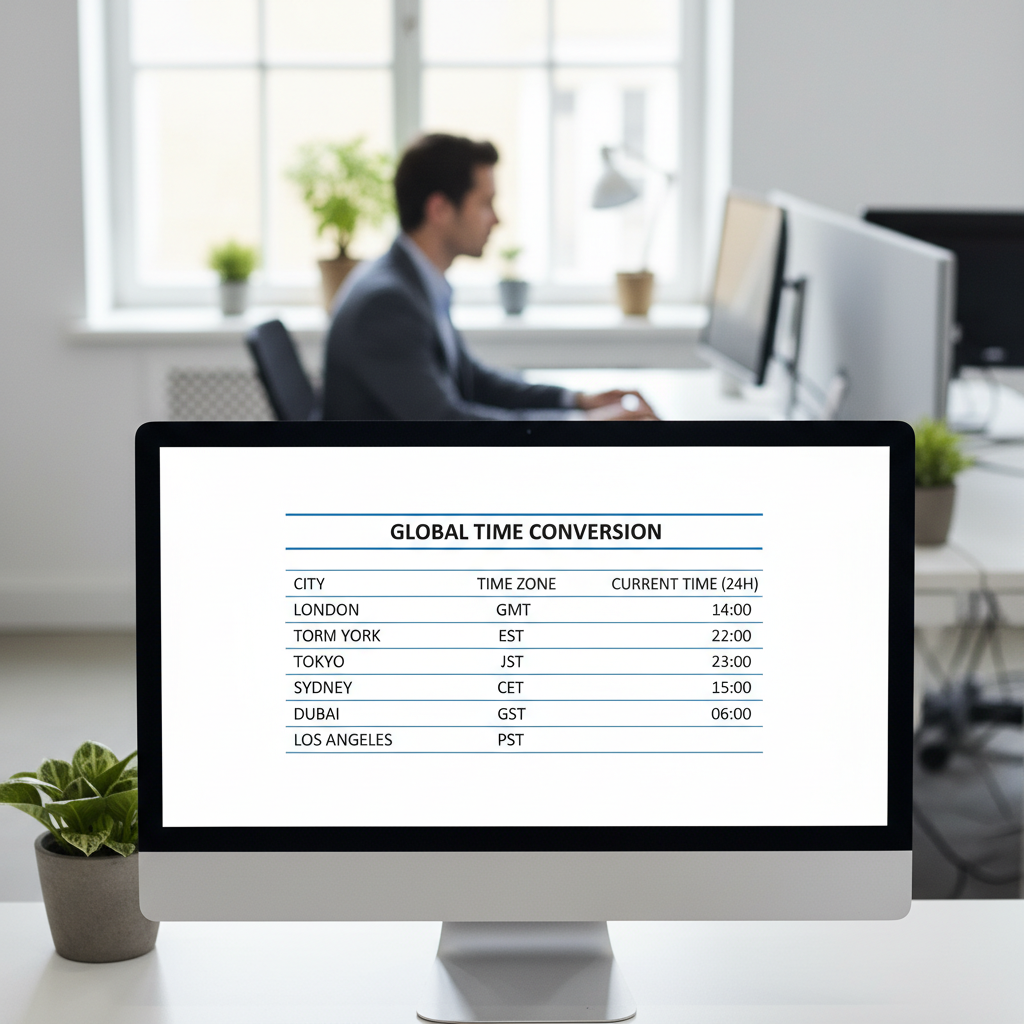
How to Read the Chart
Our time zone calculator makes it easy to understand time differences around the world. As one of our 100+ free tools, it gives you fast, clear results and removes any guesswork.
When you use our time converter, the results appear in a simple chart. This layout helps you see all the details at a glance. You’ll find your original time next to the converted times for the locations you chose.
Here’s a simple guide to reading the chart:
- Original Time and Zone: This is the time and time zone you entered, such as “10:00 AM PST”.
- Target Location(s): These are the cities or time zones you want to convert to.
- Converted Time: This is the exact time in each location you selected.
- Date Adjustment: Sometimes, the date will also change. The chart will clearly show if the date is different, like changing from “May 15th” to “May 16th”.
- Time Difference: Our chart also shows the exact time difference. This usually looks like “+X hours” or “-Y hours” from your original time.
For example, if you enter 9:00 AM PST, the chart will instantly show you the time in EST, UTC, and any other zones you need. This makes it easy to schedule meetings or calls across the world.
Common Time Zone Abbreviations (UTC, GMT, PST, EST)
Time zones often use abbreviations. Knowing them helps with accurate time conversions. While our calculator handles these for you, understanding the basics can be useful. Here are a few of the most common abbreviations:
| Abbreviation | Full Name | Offset from UTC | Description & Use |
|---|---|---|---|
| UTC | Coordinated Universal Time | N/A (Reference) | UTC is the world’s time standard. It isn’t a time zone but a reference point that all other zones are measured against. It is based on International Atomic Time (TAI) and includes leap seconds to stay accurate [3]. |
| GMT | Greenwich Mean Time | UTC+0 | GMT was the original global time standard, based on the solar time at the Royal Observatory in Greenwich, London. While people often use it like UTC, GMT is technically a time zone [4]. |
| PST | Pacific Standard Time | UTC-8 | Used in parts of North America like California, Washington, Canada, and Mexico. It is 8 hours behind UTC [5]. During Daylight Saving Time, this zone switches to PDT (Pacific Daylight Time), which is UTC-7. |
| EST | Eastern Standard Time | UTC-5 | Used in the eastern parts of North America, including places like New York, Florida, and Ontario. EST is 5 hours behind UTC [6]. During Daylight Saving Time, it becomes EDT (Eastern Daylight Time), which is UTC-4. |
There are many other time zone abbreviations, but these four are a great starting point. Our calculator knows hundreds of time zones, so you don’t have to do the math. You’ll get an accurate conversion every time.
What’s the Difference Between a Time and Date Converter?
Time converters and date converters sound similar, but they do different jobs. It’s important to know how each one works. Each tool helps with a different part of measuring time. At eLearnSmart, we offer over 100 free calculator tools to help with both.
What is a Time Converter?
A time converter works with hours, minutes, and seconds. Its main job is to change times between different time zones. For example, it can tell you that 9:00 AM in New York City is a different time in London or Tokyo. This is very useful for planning with people in other countries. It helps you find local times quickly. Our Time Zone Converter is a great example. It makes tricky time zone math easy.
Key uses for a time converter include:
- Global Meeting Schedules: Find the best meeting time for people around the world.
- Travel Planning: Get used to the time in your destination before you even leave.
- Live Event Coordination: Make sure everyone knows the local start time for a global event.
- Remote Work Management: Coordinate tasks with team members in different countries.
What is a Date Converter?
A date converter is different. It focuses on days, months, and years. It helps you work with dates on a calendar. This tool can figure out the time between two dates. It can also find a future date, like 30 business days from today. It can even tell you how many days are left until an event. eLearnSmart has several date calculators, like our Age Calculator and Date Duration Calculator.
Common uses for date converters include:
- Project Management: Figure out project timelines and deadlines.
- Event Planning: Count down the days until a special event.
- Historical Research: Find the time between important historical dates.
- Personal Finance: Calculate loan payments or due dates.
Key Differences at a Glance
Here’s a quick summary of the main differences:
| Feature | Time Converter | Date Converter |
|---|---|---|
| Primary Focus | Hours, minutes, seconds | Days, months, years |
| Core Function | Changes time between zones | Works with calendar dates |
| Key Output | The time in another location | A length of time or a specific date |
| eLearnSmart Example | Time Zone Converter | Age Calculator, Date Duration Calculator |
Why This Distinction Matters
Knowing the difference helps you pick the right tool for the job. If you use the wrong one, you’ll get the wrong answer. For example, a time converter can’t tell you how many days are left in the year. A date converter can’t change 3 PM EST to PST. Both tools are important for planning schedules and looking at data. Measuring time can be tricky [source: https://www.nist.gov/pml/time-and-frequency-division/popular-links/nist-time-frequently-asked-questions-faqs]. That’s why having the right calculator is so important.
eLearnSmart offers more than 100 free calculator tools, including both time and date converters. They are designed to help you with all kinds of calculations. Our platform makes sure you have the right tool when you need it.
Frequently Asked Questions
How do I use the Google time zone converter?
Using the Google time zone converter is easy. Just type what you want to know into the Google search bar. For example, you can search “time in London vs New York.”
Google will instantly show you the current time difference. You’ll see the time in both places side-by-side right on the results page. This means you don’t need to click on a separate tool.
For scheduling, Google Calendar also has great time zone support. You can create events in one time zone, and it will show the correct time to people in other places [7]. This makes it much easier to schedule international meetings.
What is the best free time converter calculator?
The “best” free time converter depends on what you need. There are many great options, like Google’s search tool and different world clock websites.
However, for a tool that does it all, our eLearnSmart Time Converter is a great choice. It gives you fast and accurate time zone conversions. Our platform is part of a collection of over 100+ free, professional calculators covering 13 academic subjects. This makes eLearnSmart a complete educational platform.
Our calculator provides:
- Instant Conversion: Get results in real-time.
- User-Friendly Interface: Designed for ease of use.
- Accuracy: We ensure precise time adjustments, including Daylight Saving Time.
- Integrated Platform: Access numerous other useful tools, all in one place.
So, if you want a flexible and accurate free tool, our platform offers a superior experience.
How can I convert time for a future date?
To convert time for a future date, you need a tool that handles Daylight Saving Time (DST) changes. Most good online time zone converters, including the eLearnSmart tool, can do this.
Here’s how it usually works:
- Select Your Date: Use the date picker to choose the future date you need.
- Enter Locations: Type in your current location and the location you want to compare it to.
- View Result: The tool will automatically adjust for any DST changes and show the correct time for that date.
It’s important to use a tool with up-to-date DST schedules, since rules can change depending on the year and place [8]. Our calculator stays current to help you plan accurately.
Is there a time converter Google app?
Google doesn’t have a separate “Time Converter” app. Instead, time conversion features are built into its other services. You won’t find an app with that specific name on the Google Play Store or Apple App Store.
Here’s where you can find these features:
- Google Search: As we mentioned, you can type your question right into the search bar for a quick answer.
- Google Calendar: This app lets you schedule events across different time zones, which is great for coordinating with people worldwide.
- Google Clock App: This app is mainly for alarms and checking the time in different cities. It can show you current times around the world, but it can’t convert a specific time from one zone to another.
So, if you want a tool just for converting time, you might look for a third-party app. You can also use a platform like eLearnSmart, which has a time converter as one of its many tools.
Sources
- https://www.timeanddate.com/time/zones/
- https://hbr.org/topic/global-teams
- https://www.bipm.org/en/time-ol/utc
- https://www.rmg.co.uk/stories/topics/what-gmt
- https://www.timeanddate.com/time/zones/pst
- https://www.timeanddate.com/time/zones/est
- https://support.google.com/calendar/answer/79109?hl=en
- https://www.timeanddate.com/time/dst/
